
Shopping Cart
No products
Prices are tax included
Back Office & Online Sales: Resonsibilities and Liabilities
Location: 2117 Office
Officer Incharge: Lovely DuLOS (Trainee for Online Sales Management: Ella & Kevin)
Purcahser: Dyan Galvan
Deputy Head: Rhea Baguios
Billing: Michelle Lee
Dispatch & Delivery: Arvie Balisang & Daniel Dumalaog
Administrator: Lindsey Lee
SS Status Steps Notifications for customer updates of their order. Please read more on our terms and condition on our website.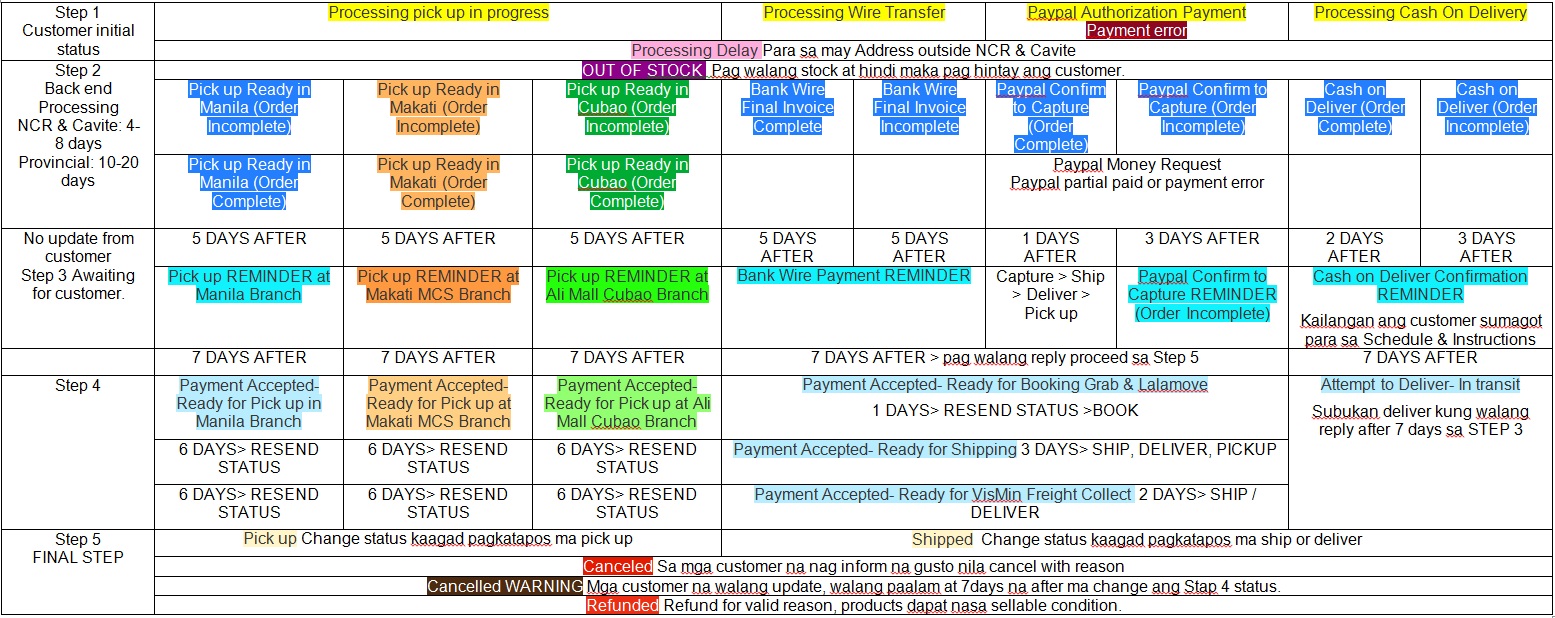
A. ONLINE PROCESSING
A.1 Processing in Progress (Yellow status-step 1)
A.1.a Review the Shipping Mode=Address of the customer. Check the location of the customer (STATE) must be correct, review shiping charge vs address.
*Sometime customer changes (STATE) to avail cheap shiping fee.
*3rd Party courier (LBC, APCargo Abest) How to compute shipping charge base on siez and weight of the final pckage:
(Rhea & Lab) please add how you compute
-Grab/Lalamove (Freight Collect) Processing fee: 60- you need to call the customer to agree on the charge of the rider.
-TOPS Van- available for COD. Fee: 600 & 800- you must upgrade and update the fee if the total volume of the order can not fit the motorcyle box. Please refer to (delivery)
-TOPS Truck- available for COD. Fee: 1,200 & 1,400 - you must upgrade and update the fee if the total volume of the order can not fit the motorcyle box & Van. Please refer to (delivery)
-TOPS Motor- available for COD. Fee: depends on the amount order and location. Not available outside NCR
-Air & Sea (Freight Collect) APCargo, Pambato etc. Processing fee: 60- you need to call and inform the customer in which courier you will book the package.
-Pick up in store- Pay in store, Paypal, Bank Wire. SHipping fee is free.
A.1.b. Review Payment mode and Shipping, processing fee- should be applicable on there location. All shipment- must be paid before shipping/booking Except COD.
-Paypal- Payment must be captured first before dispatch, Applicable to all address.
-COD is only applicble on TOPS vehicle delivery with in NCR
-Pay in Store- For customers who want to change to ship/deliver, they have only 36 hours for a free modification. Ph30 penalty for changes after 36hours.
-Bank wire- Customer can request on other payment options by apporval of the admin. Allowable vendors are BPI, BDO, Palawan, LBC, ML, Gcash
A.1.c Review and check. Messages, Private Notes and Customer Service(Message on Order).
*Customer sometimes leave instruction for delivery schedules etc.
*When customer request for special order on customize canvas sizes that are not available in our product list, please refer to CAVAS CALC for the prices. You must reply to the customer for that price of that quotation on Presta Customer Service message.
A.2 Preparation of Orders & Update Status
A.2.a Review ordered products- Gather available products from Sta Cruz (Branches). You may check the available products from the POS Stock Item Movement (recommended) if available and/or direct inquiry from all branch. Then request from the branch for transfer of items to POSBO, inform Time Keep for schedule of transfer of stocks from dispatch-delivery.
A.2.b Gather all items (ADD TO SAKO) from store that are available.
A.2.c For unavailable items from all stores. You will request a Purchase Order from Purcahser (Dyan). Please wait for the assestment if the unavailable items are Out of stock. You are responsible to seek updates from Purchaser after 24 hours. to decide for updating the status on Complete/Incomplete Status.
A.2.d For order items that are complete & if you have updates from A.2.b from Purchaser. Review the shipping charge for 3rd party courier, TOPS motor, van, truck, and analize if you need to update and change the shipping/delivery charge of the final total size/weight of the order.
A.2.e You must update status to Stage 2. with in 2-3 days after customer placed an order. You will decide if a customer or an item ordered can wait for longer period of time.
A.3 Payment & Dispatching/Organizing Orders (Mode of Payment & Shipment)
A.3.a Separate orders for COD & Pick up at stores- Inform and work with Dispatch/Time keeper, for schedule.
A.3.b For Paypal payment- Request from Billing to Capture payment.
-After Paypal is Captured- prepare for Dispatch & Ship/Deliver.
*Paypal Money request: in time of paypal money request is needed, you wil inform the customer that they need to accept/approve the moeny request sent to there paypal account, inorder to proceed with shipping. Then you will need a confirmation from the Billing for clearance to dispatch after customers updates on the request.
A.3.c For Bank wire, Money transfers- Segregate the orders for "awaiting from customers to pay".
-Refer to the Viber (UNCLAIMED) group messages for the payment updates from the customer.
-When a customers paid on Pera Padala- you must request from (Arvie) to be redeemed and ask for redemtion receipt. When cleared you must update status & ship.
*must be redeem with in 24hours. Remind and request from (Arvie) for the redemtion receipt and update status & ship.
*After 36 hours with our redemtion receipt. You must follow up and must be redeem immediatly.
-When a customer paid via Online transfers (BPI, BDO)- billing department must clear the payments then status must be updated & ship.
-When a customer paid via G-Cash- you will request from TOPS GLOBE mobile holder/user for a verification of paymetn via text notification from G-cash. then stauts must be updated & ship.
*Do not ship or dispatch the order, if it was not yet confirmed and cleared by the billing.
A.3.d Sort all Stage 4 (Payment Accepted)- You must inform the Time Keeper/Dispatch for shipping/booking.
A.4 Status Updates & Unpaid Orders
A.4.a Follow the days and schedule on above diagram. Sort Stage 2-3 Bank wire & COD Schedule
*You must resend the Status after 24hours on Stage 2 & text them thar the order is ready for payment. Do this again after 48 hours.
*After 72 hours from stage 2 & no updates from customers- You must change status to Stage 3 & Call the customer for reminder to pay.
*After 96 hours Resend & Call the customer whether to continue with the order or for cancellation.
*After 120 hours with our update from Customer. You must inform the Admin for an order Cancellation.
*ADMIN is only Authorize to CANCEL all orders.
A.4.b Cancellation of Order- You must ask and seek for a reason to cancel. Then you need to inform Admin the reason and request for cancellation
A.4.c For all Cancelled, Cancelled Warning orders. You must bring back for display all the items/products and transfer to Store (branches)
A.4.c You must gather and collect all emplty (SAKO) and organize in one location.
A.4.d For COD with out customers update of schedule for best time to deliver, you must them inform dispatch to attempt to deliver.
A.4.e When the order is shipped, delivered, you must update the status to Stage 5
A.5 Website management
A.5.a You are responsible to reply all the messages from prestashop Customer Service on website. You must change the status as “mark as handled” once shipped or replied.
*You may deligated if the message is for the branch sales representative.
A.5.b You must ADD a Private Note with the reason, reminders description for customers who changes mind on ther account.
*Some custoemrs always cancel order on the last minute. and we need to take note about this customers habbit and other concerns that customer always ask. For future memo of the specific customer relationship when they order again.
A.5.c You must read and understand out Terms & Condition, Delivery Rates and Security Policy
A.5.d Sorting All Status- You must Sort all status everyday, to identify the status to be adjsuted and update for the next stage
B. Product Management, Purchases and Back Office (POS)
B.1 Product Management
B.1.a You must remember that all receipts from suppliers must be encode at back office (POS Suppliers Delivery)
B.1.b You are responsible in ordering, follow ups and receiving suppliers delivery, so make sure items are correct and items must be tallied to the receipt handed to you by the delivery.
B.1.c You must check the items delivered to your office and make sure that it is in good condition and must be encoded on your POS and/or transfer to branches.
B.1.d You are responsible to prepare the list of products for re-ordering for international suppliers. It must be reviewed by Product Manager to be forwarded to admin for final ordering.
B.1.e You are oblige to check on saleable products from local supplier on the availability or their new arrival.
B.1.f You are responsible to promote to all branches, all local suppliers products that is available and saleable and must be approved by OM and/or admin for ordering.
B.2 Pucrchases
B.2.a You are responsible to collect all the receipts from the purchases and sort it out by suppliers to be forwarded to admin every Wednesday for issuance of cheque payment. Review, tally and itemize on a piece of paper all invoice.
B.2.b Ensure cheque payments are submitted to their respective receivers or supplier. (Friday)
B.2.d Cannot receive orders from customers directly unless you substitute as Sales Rep.
B.4 Back Office (Point of Sale)
B.4.a You must log in to your account when you use the software
(Rhea & Lab) please add how you compute
C. REPORTS
C.1 Excell Report
C.1.a Payment receivables from Bank wire, Money transfers, Deposit of branches nust include on the excell report
C.1.b Delivery of the day must include total delivery amount with a comment that state of date of down payment and location of down payment was made (in store, bank or online), Name of the customer, Location of payment, Presta and OR# , Courier, Shipping fee, Discount given, and Actual Shipping cost.
*Example of OR info from Sta Cruz Branch – OR#123SC, OR#123MCS, OR#123ALI
C.1.c Gasoline Expenses must be encoded to your report and officer needs to check on the odometer reading once in a while if the reading by the driver is correct and all details of gasoline receipt like KM reading, litres, total amount, date and total litres filled on the vehicle.
C.1.d Petty Cash must be accurate as possible. Please include payment receivable from delivery, withdrawal cash from bank and branches, customer payables
C.1.e. Petty Cash expenses of paid out for expenses of gasoline, courier charges, purchases and changes (sukli)
C.1.f. You must count the money inside the cash box accurately and encode on excel report make sure it is tallied, if not must be reported immediately.
C.1.g You must email the sales report to the admin
C.2 POS Back Office
C.2.a Transfers, Sales Invoice, Supplier Deliveries (stock receipt) must be emailed once a week to the Auditor. Unfinished transactions must be informed and missing transactions is subject for investigation and penalties.
C.2.b Monthly Sales by Supplier must be emailed to lindslee2000@gmail.com
Purchasing & Webside Management
Location: 2117 Office
For orders with LS local supplier products, please place and order via call, text or email and advise DD for pick up if ready. Update OS out of stock, missing orders on orders (website) and update customer for other options or if they still want to add some items or continue with SS Status Step 2.
A.1.d If there are products that appears out of stock in the website, and if it is available in the store/supplier, please update website or assign to SR immediately
A.1.e Always take note that all products from local suppliers must be gathered and consolidate in one pick up and/or delivery direct to branch.
A.1.f You are responsible to seek for updates for orders that are manufactured and produced by TOPS production in Cainta. You must follow up on the date of accomplishment and schedule with OM the time of shipping/delivery.
A.2 Preparation and Updates (Step 2)
A.2.1 Update shipping charge and product prices if necessary after processing the order.
A.2.2 You need to make sure that costumer must be informed or be advice if there are changes from their original order via prestashop update, text, messenger, email or call.
A.2.3 You must update the status once everything is ready. Please refer to the Step 2 on prestashop status notification updates.
A.2.4 You must proceed for dispatching of orders when payment is receive or approved by OM and admin approval.
A.2.5 You are responsible to make sure ordered products are correct, secure and properly pack for DD- dispatching and shipping.
A.2.6 You oblige to print the receipt from prestashop, and check ordered items and make SI sales invoice on all orders.
A.2.7 You must take note that customers are not allowed to modify their orders on SS Step 2
A.3 In-Store Pick up (All branches)
A.3.1 You are responsible to inform the branch SR Sales Rep to open and check on the product ordered if it is available in the store.
A.3.2 For LS local supplier products that is not available in-store branch, Please proceed to processing order starting A.1.1
A.3.3 Check the stocks if available on other branch via Stock Item Movement (recommended) and or direct inquiry.
A.3.4 Coordinate with OM for schedule of delivery to branch if the order is ready, and/or if SR can carry the items by hand if accessible.
A.3.5 You are responsible to ask for update from SR for follow up and remind customer. If the customer fails to pick up please update the status to Cancelled Warning
A.4 Reminders and Confirmation
A.4.1 Customers is given 5 days to response on Step 2. If customer fails to respond please send Step 3 reminders and notification
A.4.2 You have to remember to update status on due dates and payment receivables.
A.4.3 Proceed to step 5 if customer still fails to respond after 10 days after Step 3 is changed.
A.4.4 Update status to Step 5 for good orders, out of stock, refunded.
A.4.5 Inform admin for order cancelations with reason and or screen shot of customer response for cancelation.
PAYMENT AND DISPATCHING
B.1 Bankwire, Money Transfer, Pera Padala, Paypal
B.1.1. You must check payment and make sure it is cleared by OM and/or admin before order dispatch
B.1.2. You need to make sure that Money transfers or “pera padala” must be cleared and approve from admin first before you dispatch
B.1.3 You must remind the customer to request to add recipient's name, payable to MICHELLE PAULINE LIM when sending payment using MLhuiller.
B.2 Cash on Delivery
B.2.1 You are responsible for the delivery man to know if the order delivery is paid, or unpaid and if need change for the payment.
B.2.2 Do not release the product delivered if customers refuse to pay the delivery charge, gate or village charges and items ordered.
B.2.3 In an event that customer ask to pay later or via bank transfer. You are responsible if you approved or guarantee your customer. You will pay for the penalty and charges when customer failed to pay after 2 months.
B.2.4 Inform your OM for unpaid and changes of mode of payment immediately when items is delivered.
B.2.5 Payment received from delivery must be secured and deposited immediately when reach the quota not more that Php5,000 from your cash box.
B.2.6 You must always remind DD to let the customer fill up TOPS prestashop receipt copy with there name, signature and time of delivery
B.2.7 You responsible to request from admin to give the delivery man change for money in receiving cash from the COD customer, especially if the customer requested for change (from cainta)
B.2.8 In a event that customer failed to respond on Step 3 & 4. Please coordinate with OM on what to do next. Maybe attempt to deliver without signs or approval from customer and/or inform admin for cancel warning of the order.
B.3 Shipping via Courier
B.3.1 Before shipping, do not forget to double check if payment is approve or check if received properly.
B.3.2 You must use reliable shipping company with our admins approval like LBC, Ap cargo, Pambato, Grab and Lalamove only for shipping.
B.3.3 Always make sure to include TOPS handling fee for customers bill. (for booking via grab and lalamove is Php60 and LBC, AP, Pambato is Php130)
B.3.4 You are responsible to label with complete information on the package to be ship out.
B.3.5 You are responsible to pay the courier for their charges and fees.
B.3.6 You must update SS status for shipped when package is already received by the courier.
B.3.7 Always ask for ETA Estimated time of arrival to our customers address and or tracking number if available and forward to the customers for customers reference.
B.4 Dispatching for TOPS Delivery
B.4.1 Always remind The person in charge of packing and/or delivery to check the items before leaving the premises.
B.4.3 You must update the customer for the status of their order and confirm the customer if they are available on that time of delivery, and if they are available you must update the delivery man to deliver the items
B.4.4 You must communicate with the OM Operations Manager for her to organized the schedule delivery.
Productions
C.2.1 after Sales Rep, placed an order for TOPS (Kulay) items that need to be repack or reproduce. You are responsible to ask for updates from production team, and schedule with OM the date of dispatch.
C.2.2 You are oblige to check on TOPS (Kulay) from branches item movement to check if they still have stocks available to their store and if they need to restock for display.
.
C.5 BIR
C.5.1. You are responsible to follow up the person assigned for purchasing report. And must be gathered for tax declaration before the deadline on the 20th of every month.
C.5.2 All sales registered in the POS must be updated and gather for the monthly declaration of tax.
C.5.3 Total sales of all branches must be reported to admin for verification of monthly vat declaration amount for approval. Computations must be done at the 1st week of the month.
C.5.4 You are responsible to update the accounting books (Sales Journal) from branches regularly.
C.6 SSS, Philhealth, BIR.
C.6.1 You are responsible in communicating to the accountant and sending all the purchases, sales and book accounts and report it to the admin the update.
C.6.2 SSS You are responsible to assign to pay the sss due accounts every 20th of the month.
C.6.3 BIR You are responsible to assign to pay the BIR due taxes every 15 or 25 of the month.
C.6.4 PHILHEALTH You are responsible to assign to pay the PHILHEALTH due accounts yearly.
C.6.5 Yearly Renewal of Permits must be remembered and planned for processing.